About Flambé®: Merge & Cook
Dive into the delicious world of Flambé: Merge & Cook, where kitchen creativity knows no bounds! Merge ingredients, unlock new recipes, and build your culinary empire! Will you rule the kitchen or get burnt?
👩🍳 Merge Ingredients:
Slice, chop, and flambé basic ingredients to create mouthwatering dishes! The more you merge, the more complex and exciting your recipes become!
🏆 Master Recipes:
Unlock and master a wide variety of dishes, from appetizers to desserts. Can you cook up the ultimate feast?
🌍 Build Your Restaurant:
Design and decorate your restaurant to attract customers. Watch your culinary empire grow as you serve up your unique creations in stunning locations.
🎨 Stunning Graphics:
Enjoy vibrant visuals and detailed animations that bring your kitchen and recipes to life.
Ready to become the ultimate chef? Download Flambé: Merge & Cook now and start your culinary adventure today!
What You Need to Top Up
Applicable Platforms
PC, Mobile
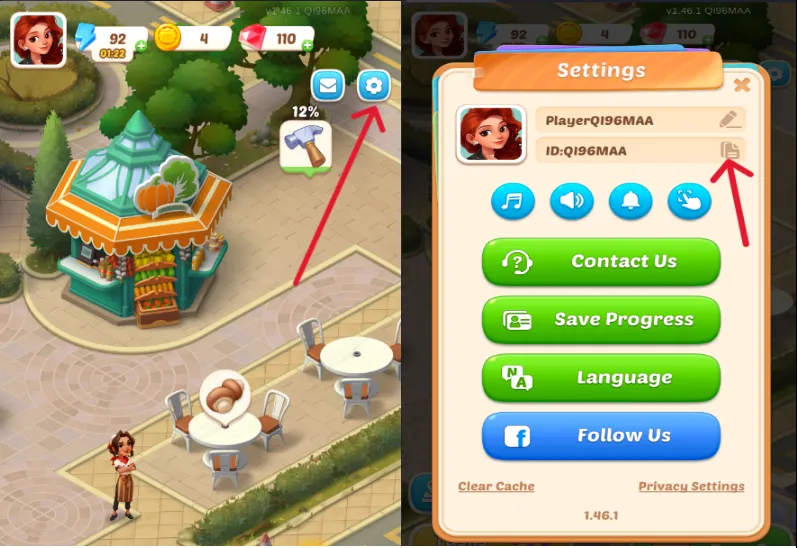
Required Information for Flambé®: Merge & Cook Top-up
Note: Please make sure you have linked your game with one account before the top-up
1. FaceBook account & password
2. User ID