Top up logoTop up logo
guide registrationRegistrati subito per usufruire del 15% di sconto in omaggio per i nuovi iscritti!Vai alla registrazione >
Tasty Travels: Merge Game

Tasty Travels: Merge Game

Consegna immediataConsegna immediata
🔥Invita amici e ricevi 15%OFF

Top up with Google/Facebook Account. Click right '?' for binding help. 

Altri giochi che potrebbero piacerti

Descrizione

About Tasty Travels: Merge Game

Tasty Travels

"Open your phone and join us on a journey around the culinary world!" In "Tasty Travels", you get to travel the world while experiencing local cuisines, learning to make various specialty dishes, and sharing with friends from all corners of the globe! The most exciting part? You can combine two identical ingredients to create new exquisite dishes, reveling in the joy of cooking!

Unique Gameplay: Merge and Explore.

Innovative Merging: Discover and merge identical ingredients during your journey, exploring new culinary secrets and enjoying the unique fun of merging!

Culinary Map: Experience over 500 types of local cuisines, each with its unique method of preparation and story!

Quest Challenges: Assist other tourists with their food requests to unlock more recipes and travel destinations!

What You Need to Top Up

Applicable Platforms

PC, Mobile

Required Information for Tasty Travels: Merge Game Top-up

Note: Please make sure you have linked your game with one account before the top-up

1. Google/Facebook account & password

2. User ID

Image

Procedure di ricarica

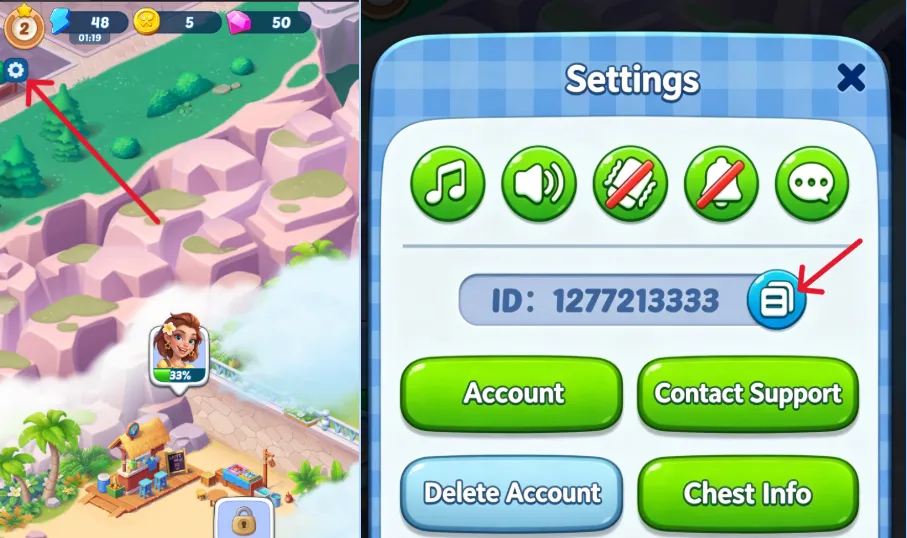
How to find your Player ID?

1. Tap Setting in the top left corner to open the profile screen.

2. Copy your UID.


How to Top Up Tasty Travels: Merge Game on LDShop

1. Go to the official LDShop website, select your language and currency, and log in.

2. Choose how many Diamond you want, enter your Character ID and Character Name, then click “Top Up Now”.

3. Pick your preferred payment method and complete the payment.

4. Check your order status in the Order Center. Once the top‑up is done, log into the game to confirm your Diamond balance has increased.

If you run into any issues, contact our customer support (click the support button in the bottom‑right corner of the platform).